


Understanding the Importance of a Clean Email
A clean email inbox is not merely an aesthetic preference; it significantly impacts productivity, stress levels, and the efficiency of communication. As individuals and organizations accumulate numerous messages over time, the likelihood of fostering an overloaded inbox increases, thus leading to several detrimental effects. A cluttered inbox can act as a significant source of stress, making it challenging to keep track of important communications and tasks. When sifting through overwhelming amounts of information, the risk of overlooking crucial emails also rises, which can have drastic implications for both personal and professional responsibilities.
Moreover, a clean email enhances organization. Implementing systematic methods for managing emails, such as categorizing messages and utilizing folders, results in easier access to vital information and facilitates a clearer understanding of tasks at hand. This systematic approach not only aids in pinpointing important emails rapidly but also minimizes the time spent navigating through a chaotic inbox. When messages are compartmentalized appropriately, attention can be directed towards what genuinely matters, improving overall focus.
Additionally, maintaining a clean email fosters better communication practices. When your inbox is organized, replying to emails and engaging in conversations becomes more streamlined. This is particularly beneficial in professional settings, where timely responses may significantly affect collaborations and client relations. Ultimately, the motivation behind decluttering your inbox transcends beyond aesthetics; it contributes to a more efficient, less stressful, and productive work environment. The benefits of investing time in a clean email are evident and widespread, making it a worthwhile endeavor for anyone aiming to enhance their digital communication experience.

Strategies for Achieving a Clean Email Inbox
In the pursuit of a clean email inbox, adopting practical strategies can significantly enhance your email management. One of the first steps is to unsubscribe from newsletters and promotional emails that no longer serve your interest. This action reduces the clutter, making room for essential communications. Regularly evaluating your subscriptions ensures that your inbox remains relevant and manageable.
Another effective method for achieving a clean email experience is to organize your emails using folders or labels. By categorizing emails based on projects, urgency, or sender, you can swiftly locate important messages while keeping less critical emails at bay. Investing time in setting up a structured system will save you time in the long run.
Utilizing filters to automatically sort incoming emails is also a valuable strategy. Most email platforms offer the option to create rules that direct specific types of emails into designated folders, further minimizing your inbox’s load. For instance, urgent emails can be directed to one folder while newsletters can slip into another, allowing you to focus on high-priority tasks without distraction.

Lastly, setting aside dedicated periods for checking and responding to emails can foster a more productive workflow. Rather than constantly monitoring your inbox, designate specific times during your day for email engagement. This practice not only safeguards you from interruptions but also promotes a more systematic approach to managing your email correspondence.
By implementing these strategies, you can cultivate a clean email environment that enhances both your efficiency and peace of mind. A structured inbox enables you to focus on critical tasks without the overwhelming burden of excessive emails.
Tools and Applications for Maintaining Clean Email
In the quest for a clean email environment, several tools and applications can significantly streamline the process of managing your inbox. Among the most prominent email clients, platforms like Gmail, Outlook, and Apple Mail offer built-in features that can assist in achieving email cleanliness. Gmail, for instance, employs robust spam filters and smart categorization, allowing users to automatically sort promotional emails, social updates, and personal communications. This helps in prioritizing important messages and reducing clutter.
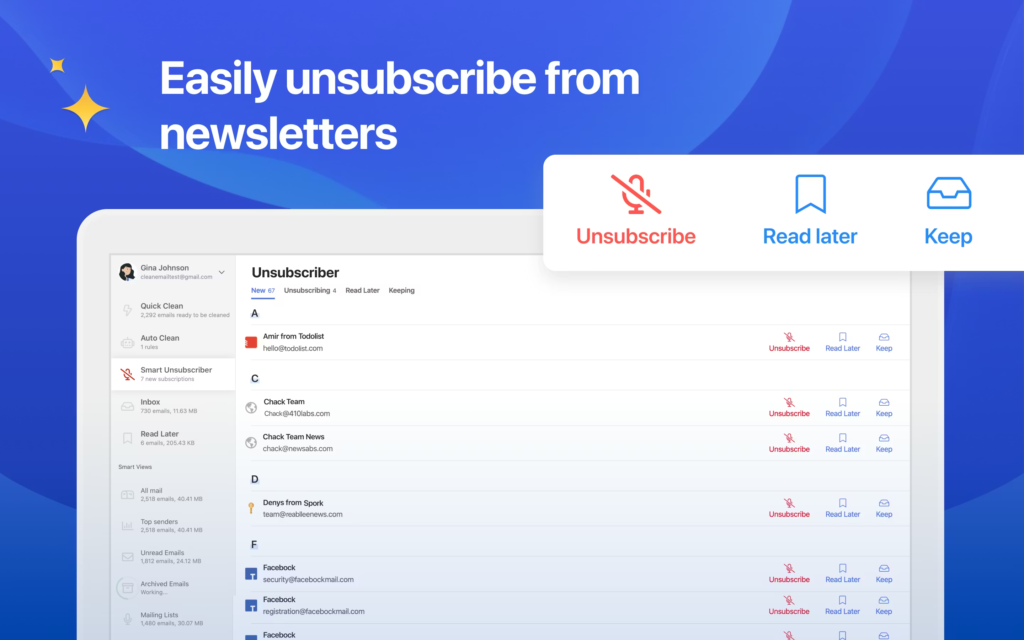
On the other hand, Outlook offers focused inbox capabilities, which isolate your most important emails from less critical correspondence. Apple Mail provides similar functionalities, allowing users to create specific folders and rules to maintain a clean email architecture. While these built-in features suffice for many users, there are also third-party apps designed specifically for enhancing email management. Tools such as Clean Email and Unsubscribe Me can help automate the process of unsubscribing from unwanted newsletters, which is one of the most effective ways to maintain a clean email account.
Cleaning apps like Clean Email employ algorithms to categorize emails, identifying bulk messages and subscriptions that take up space in your inbox. These tools not only allow for seamless unsubscription but also offer insights into your email habits, enabling users to adjust their consumption patterns. While these applications can provide a more streamlined experience, they do have their drawbacks, such as potential privacy concerns associated with granting access to one’s inbox.
In choosing the right solution for maintaining a clean email, consider factors such as cost, features, and your specific email use-case. Balancing these aspects will ensure that your choice contributes positively to managing an organized and efficient inbox.
Creating Long-Term Habits for a Clean Email Lifestyle
Maintaining a clean email inbox requires consistent effort and the establishment of effective habits. One particularly useful technique is the ‘Two-Minute Rule.’ This rule states that any email that can be addressed in two minutes or less should be dealt with immediately. By doing this, you can quickly eliminate small tasks without allowing them to accumulate and clutter your inbox. This method not only helps keep your email organized but also enhances your overall productivity.
Regularly reviewing your inbox is another critical practice for sustaining a clean email environment. Consider scheduling weekly or bi-weekly sessions dedicated solely to email management. During these reviews, you can categorize messages, respond to lingering items, and delete unnecessary emails. This periodic assessment will serve to reinforce your commitment to maintaining an orderly inbox, allowing for better tracking of important communications.
Furthermore, setting clear boundaries for email communication can significantly improve your email habits. This might involve designating specific times during the day when you will check your email, rather than constantly monitoring it. Such boundaries can reduce distractions and assist in focusing your attention on more pressing tasks. You might also consider using tools that allow you to mute certain conversations or unsubscribe from newsletters that no longer serve you. These strategies will not only contribute to a clean email but also foster a more streamlined approach to managing your communications.
Ultimately, by institutionalizing these practices and adopting a framework of discipline around your email habits, you can facilitate a clean email lifestyle. With intentional actions, such as implementing the ‘Two-Minute Rule,’ scheduling regular reviews, and establishing email boundaries, you can ensure that your inbox remains manageable in the long term.
